Building a whole game UI from one image
Every button, bar and panel in Nova comes from one 256x256 Retro Diffusion sheet. How to cut a UI sheet with crops, 3-slice and 9-slice, and swap skins.
 AstropulseNovember 9, 2026 · 7 min read
Every button, bar and panel in our space shooter Nova comes from one 256x256 image. Swap that image for another one and the whole game reskins itself, with no layout changes and no redrawing. Here's how it works, and how you can do the same for your game.
The image
The sheet is a single generation from Retro Diffusion's UI Panel style (an RD Pro style, $0.18 an image). It draws a full UI kit on a 256x256 canvas: a long progress bar, small icon buttons with a normal and a highlighted copy of each, a big square button, sliders, toggles, checkboxes, and a panel border.
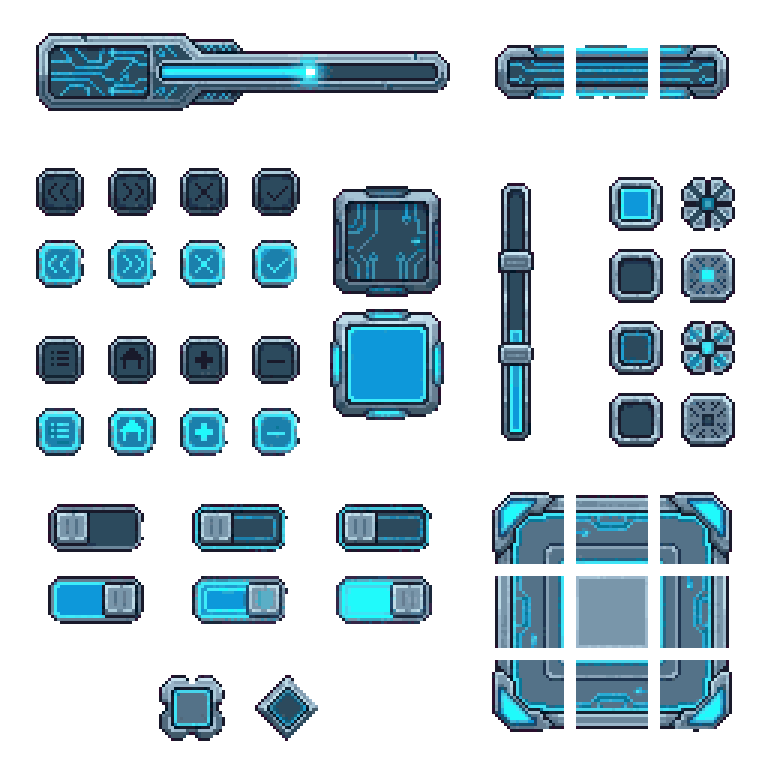
The important part: every sheet from that style uses the same layout. The close button is always in the same spot, the panel corners are always in the same cells. So the code that cuts one sheet cuts all of them.
Try it below. Pick a sheet, hover a piece of the UI on the right to see where it comes from, and drag the sliders to resize the bar and the panel. Nothing on the right is drawn by hand; it's all cut from the image on the left.
Three ways to cut a sheet
Everything in Nova's UI uses one of three cuts.
1. Plain crops: buttons and icons
Small fixed-size pieces are just rectangles copied out of the sheet. Nova's arrows, close, confirm, plus, minus, menu and home buttons are each a 24x24 crop.
The sheet draws every button twice: a normal copy, and a highlighted copy one row down. Use the second one for hover or pressed. That's two button states for free, and they always match.
2. 3-slice: bars
A bar has to stretch to any length without its ends stretching with it. So you cut it in three: the left cap, a middle piece and the right cap. Draw the caps as they are and fill the gap with the middle. Nova's experience bar works this way: its middle is the same all the way across, so it simply stretches.
3. 9-slice: panels and buttons that resize
A panel has to stretch in both directions, so you cut it into nine: four corners, four edges and the centre. Corners never change. Top and bottom edges repeat sideways, left and right edges repeat up and down, and the centre fills the rest. Nova's inventory panel is a 9-slice, which is why it can be any size the inventory needs.
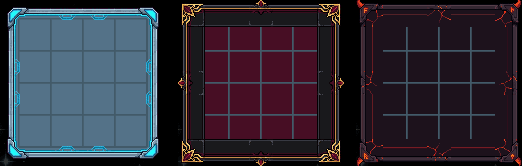
Here's a complete 9-slice for an HTML canvas. Pass it the sheet and the three spans of each axis on the sheet (start, middle, end):
// xs, ys: [start, middle, end] spans of each axis, as [from, to] in sheet pixels.
function draw9Slice(ctx, sheet, xs, ys, dx, dy, w, h) {
  const lay = (spans, size) => {
    const [a, mid, b] = spans.map(([s, e]) => e - s);
    const out = [{ src: spans[0][0], len: a, at: 0 }];
    for (let at = a; at < size - b; at += mid) {
      out.push({ src: spans[1][0], len: Math.min(mid, size - b - at), at });
    }
    out.push({ src: spans[2][0], len: b, at: size - b });
    return out;
  };
  ctx.imageSmoothingEnabled = false; // keep the pixels crisp
  for (const r of lay(ys, h)) {
    for (const c of lay(xs, w)) {
      ctx.drawImage(sheet, c.src, r.src, c.len, r.len, dx + c.at, dy + r.at, c.len, r.len);
    }
  }
}
A 3-slice is the same function with one span on the other axis. It's exactly what the demo above runs.
Repeat patterned pieces, don't stretch them. A plain strip can stretch along its length without anyone noticing, but stretching a detailed 24 pixel edge to 37 pixels makes uneven, smeared pixels. Repeating it (and clipping the last copy) keeps every pixel the size it was drawn. Same rule for scaling the whole UI: only by whole numbers, 2x or 3x, never 2.5x.
Swap the whole look
Because every sheet shares the layout, a reskin is one script. Nova's skin builder reads a new sheet, cuts it at Nova's coordinates, and writes each piece at exactly the pixel size the game already uses, so no layout code changes.
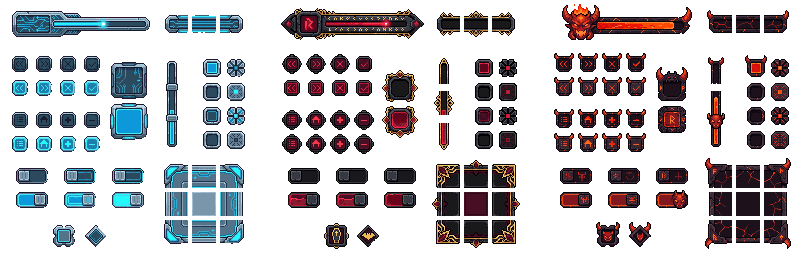
A few tricks made the swap clean:
- Text buttons are 9-sliced from the sheet's plain square button, then the game's existing lettering is drawn back on top in a color that suits the new skin.
- Colors drawn in code follow the skin. Anything Nova draws itself, like highlights and menu text, swaps to the new sheet's main accent color, which the script reads off the sheet's arrow button.
- Crops keep the ornaments. Fancy sheets have corners and horns that hang outside their cell, so the cuts include a few pixels of margin around each piece.
Do it for your game
- Generate a UI sheet. Open Retro Diffusion, pick the UI Panel style and describe the look: "haunted gothic, dark iron and gold filigree", "sci-fi cockpit, cyan glow". Make a few and keep the best.
- Map the template once. Note where each piece sits on the sheet: button cells, highlighted rows, bar caps, panel cells. Write them down as rectangles in one file.
- Cut with three functions: a crop, a 3-slice, a 9-slice. That covers buttons, bars, panels, windows, tooltips and dialog boxes.
- Match your game's palette if the UI should share colors with the rest of your art. The free Palette Converter recolors a sheet to any palette in one step.
- Ship more skins. Every extra sheet is a new theme, a seasonal event or an unlockable for $0.18.
How the video was made
The video is the real game, not a mock-up. A small harness runs Nova in headless Chrome on a frame-stepped clock, so each step advances exactly one frame at 30 fps and every take is identical. It sends real mouse and key events, and logs each sound the game plays to the frame it played on, so the edit can put the sound effects back exactly in sync. The skins are swapped live while it records.
Frequently asked questions
How do I make a pixel art UI for my game?
Generate a full UI sheet in one image (Retro Diffusion's UI Panel style draws buttons, bars, panels and toggles together on a 256x256 canvas), then cut it in code: plain crops for buttons, 3-slice for bars and 9-slice for panels.
What is 9-slice scaling?
A way to resize a panel without distorting it. The image is cut into four corners, four edges and a centre. Corners stay as drawn, edges repeat along their length and the centre fills the middle, so the border looks the same at any size.
What is the difference between 3-slice and 9-slice?
3-slice cuts along one axis (left cap, middle, right cap) for things like bars that only stretch in one direction. 9-slice cuts along both axes for panels and windows that stretch in both.
Can I reskin my game's UI with a different sheet?
Yes, if every sheet uses the same layout. Retro Diffusion's UI Panel style does, so one cutting script turns any of its sheets into a full matching skin.
How do I keep pixel art UI crisp when scaling?
Turn off image smoothing, repeat the middle pieces instead of stretching them, and only scale the whole UI by whole numbers like 2x or 3x.