Making consistent art for your game using one palette
Mixed asset packs and AI art clash because each brings its own colors. How one shared palette fixes it, with a free color reducer and palette converter.
 AstropulseNovember 9, 2026 · 6 min read
Your game looks "off" because every asset picked its own colors. Each sprite is fine on its own. Put them in one scene and something's wrong: the knight is ice-blue, the hacker glows neon pink, the witch looks washed out. It's not the drawing. It's the colors.
The problem: every asset brings its own colors
An asset pack picks its colors. Another pack picks different ones. Every AI generation invents a fresh set from scratch. Each source is internally consistent, so nothing looks broken until you combine them, and then nothing quite belongs.
Here's a real example. A top-down village square and six characters, every one generated separately with Retro Diffusion's top-down style. Toggle between them as generated and on one palette:
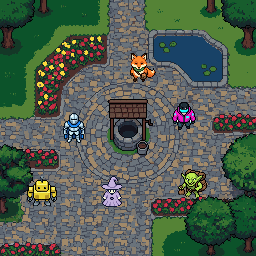
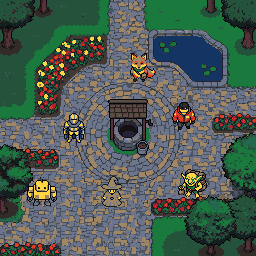
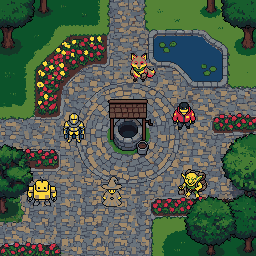
Look at the hacker by the well. On their own they're a great sprite. In this square they're a neon sticker, because that pink exists nowhere else in the picture. Switch to "One palette" and every character suddenly lives in the same village.
The fix is one rule: everything in a scene draws from the same palette. That's what makes great pixel art games look cohesive: every sprite, tile and effect is shaded from the same set of ramps, so nothing looks pasted in.
Two tools, two jobs
The Color Reducer cuts an image down to a few clean colors and picks the best ones automatically. Use it for a single asset that has too many colors: AI output with hundreds of near-identical shades, a downscaled photo, a painted sprite.
The Palette Converter maps an image onto a palette you choose: Endesga 32, Apollo, AAP-64, anything from Lospec, or your own. Use it to make different assets match: run every sprite through the same palette and they belong together instantly.
How to pick your palette
- Start from your background. It covers the most screen, so let it set the mood. Pull its colors with the Palette Extractor, then convert every sprite to them. That's exactly how the "one palette" version of the scene above was made.
- Or start from a proven palette. Endesga 32, Apollo (46 colors) and AAP-64 are popular for a reason: their ramps are built to work together, with enough steps for skin, foliage, stone and metal.
- Size it for your game. 32 to 64 colors gives a full game room for every material and mood; very small palettes (16 or fewer) suit tiny sprites and strict retro looks. Whatever the size, keep it fixed so a big team or an AI model stays consistent.
- Use ramps, not one-offs. A palette that's a set of dark-to-light ramps (skin, foliage, stone, metal) shades anything. Random single colors won't.
Same scene, different mood
A shared palette also lets you change the mood of the whole game at once. Same assets, different palettes:
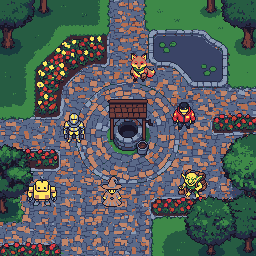 Village paletteEndesga 32
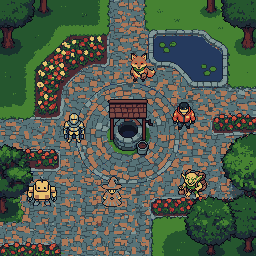 Village paletteApollo
Endesga 32 makes the village punchy and saturated, with slate-blue stone and orange highlights; Apollo softens it into a muted, storybook look. Every character changes with the world around them, because they all draw from the same colors.
Get consistent colors from the start
Converting afterwards works, but the best result comes from art that's drawn in your palette. Retro Diffusion's models can generate with a palette you choose, so every new asset arrives in your game's colors. No cleanup, and the shading is built for those colors rather than squeezed into them.
Frequently asked questions
Why do my pixel art assets look like they don't match?
Each asset pack and each AI generation brings its own colors. Every source is consistent on its own, but combined their colors clash. Converting everything to one shared palette fixes it.
How many colors should a pixel art game palette have?
32 to 64 colors gives most games room for every material and mood; small palettes of 16 or fewer suit tiny sprites and strict retro looks. Build it as dark-to-light ramps (skin, foliage, stone, metal) so it can shade anything.
What is the difference between a color reducer and a palette converter?
A color reducer cuts one image down to a few colors it picks automatically. A palette converter maps any image onto a palette you choose, so different assets end up with exactly the same colors.
Where can I find good pixel art palettes?
Popular choices include Endesga 32, Apollo, AAP-64 and Resurrect 64, and Lospec hosts thousands more. You can also extract a palette from your own background art with a palette extractor.
Can AI generate pixel art in my game's palette?
Yes. Retro Diffusion can generate with a palette you provide, so new assets arrive in your game's colors with shading built for them.