Retro Diffusion beats PixelLab in an independent benchmark
A university study scored Retro Diffusion and PixelLab on six pixel art metrics. Retro Diffusion won overall, using its cheapest model. Results explained.
 AstropulseSeptember 11, 2026 · 8 min read
The short version: an independent study from Hochschule Darmstadt compared the two best-known AI pixel art generators, Retro Diffusion and PixelLab, on metrics built for pixel art. Retro Diffusion scored higher overall. It won the biggest category, shape separation, by the widest margin, and it did it with RD Fast, its cheapest model.
Why this benchmark matters
Most AI image comparisons use general scores built for photos: sharpness, realism, how closely the image matches the prompt. Those scores are close to useless for pixel art. A blurry, glowing, 300-color image can score well on "image quality" and still be unusable in a game.
This study did something smarter. Chisaki Broschinski at Hochschule Darmstadt, University of Applied Sciences, built a test around what makes pixel art pixel art, then ran 120 generations through both tools with several prompts and palettes from 2 to 256 colors.
The six things it measured
Each metric maps to a real problem you hit when putting AI art into a game.
| Metric | What it checks | What failure looks like |
|---|---|---|
| Shape separation | Do forms hold together as clean silhouettes? | Objects dissolve into scattered, speckled pixels |
| Color clustering | Are related colors grouped into solid areas? | Noisy confetti of near-identical shades |
| Readability | Can you tell what you are looking at, at 1x? | Mush that only reads when blown up |
| Gradient reduction | Are shades stepped deliberately? | Long smooth ramps, like a photo |
| Palette accuracy | Does it use the colors you asked for? | Extra colors that break your game's palette |
| Tileability | Does a tile repeat without seams? | Visible edges when the tile is repeated |
The first four are about structure: whether the image is built like hand-made pixel art or like a downscaled painting. That's the hardest thing for AI to get right, and it's where the gap showed up.
The results
"RetroDiffusion achieved a higher overall score than PixelLab, largely due to stronger performance in shape separation, clustering, readability, and gradient reduction."
The single biggest difference was shape separation:
"Since this metric rewards coherent silhouettes and penalizes scattered pixel structures, the result suggests that RetroDiffusion produced more visually coherent forms within generated backgrounds. Similar trends were observed for readability and clustering scores, indicating improved grouping of related colors."
In plain terms: Retro Diffusion's images held together as solid, readable shapes with clean color groups. That's the difference between art you can drop into a game and art you have to redraw.
The benchmark used Retro Diffusion's cheapest model
The Retro Diffusion model in the study was RD Fast, built for speed and price at $0.03 an image. PixelLab was tested with its strongest offering. RD Fast still came out ahead overall.
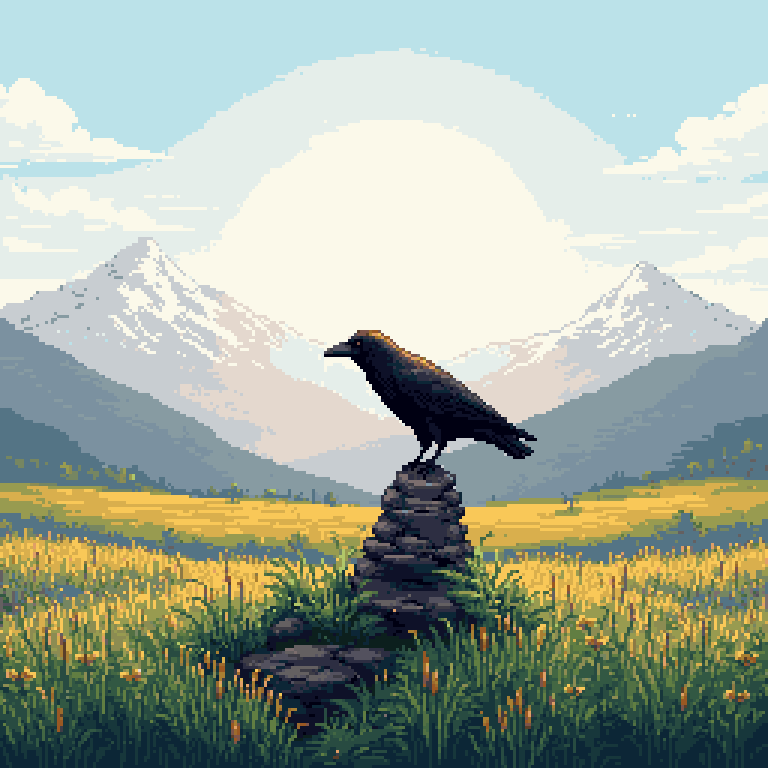
Retro Diffusion has two stronger image models. Here's RD Fast next to RD Pro on the same prompt. Drag to compare:
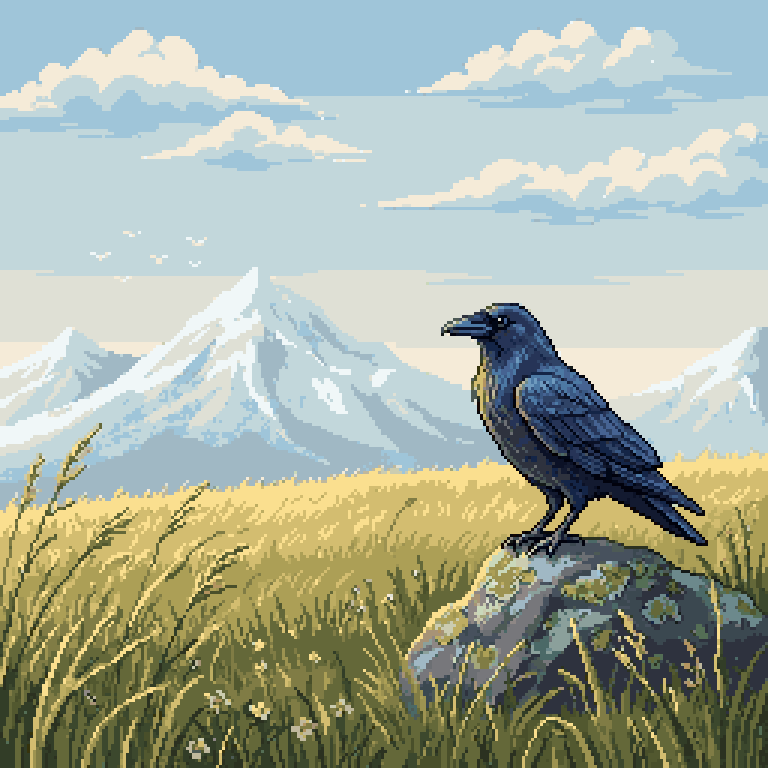 RD FastRD Pro
Look at exactly what the benchmark measures:
- Shape separation: RD Pro's raven has distinct feather groups and a clear wing edge. RD Fast's is one dark mass.
- Readability: the RD Pro raven's eye and beak read at 1x. In RD Fast they're a few pixels.
- Clustering and gradients: RD Pro's grass is made of deliberate clumps of color, not a smooth wash.
If the cheapest model wins on these metrics, the gap with RD Pro is wider still.
Which Retro Diffusion model should you use?
| Model | Price per image | Best for |
|---|---|---|
| RD Fast | $0.03 | Quick ideas, icons, volume work, iteration |
| RD Plus | $0.06 | Game assets with more detail and style range |
| RD Pro | $0.18 | Final art: the best structure, prompt following and reference images |
A practical workflow: explore with RD Fast, then make the keepers with RD Pro. If you need lots of small images, you can pack several into one RD Pro generation and cut the cost a lot. Here's how we made 32,000 images for $400.
How to judge any AI pixel art yourself
You don't need a research lab to run these tests. Before you use an AI image in a game, check it at its real size (1x) and zoomed in:
- Count the colors. Real pixel art usually uses 8 to 32. Hundreds of colors means it's a painting with a pixel filter.
- Zoom to 800%. Every "pixel" should be one solid square of one color. Blurry or uneven blocks mean it's off-grid.
- Squint at 1x. If the shapes vanish into noise, the shape separation is poor.
- Look for smooth gradients. Long, soft ramps in skies and shadows are a giveaway.
- Tile it, if it's meant to repeat.
Some of this you can fix after the fact. Reducing an image to a real palette sorts out color count, clustering and gradients:
And if the pixels are off-grid, the free Pixel Art Fixer snaps them back to a real grid. But no post-processing fixes poor shapes. That has to come from the model, and it's exactly what this benchmark measured.
Why specialized models win
Many AI pixel art tools are a general image model with downscaling, palette reduction and pixel snapping added afterwards. Those steps help. But pixel art is built on restriction: limited resolution, limited colors, every pixel placed on purpose. General image models are trained to do almost the opposite, adding smooth detail everywhere.
Retro Diffusion's models are trained for the medium, mostly in-house, alongside dedicated pixel art pipelines. That's what shows up in shape separation and readability, and it's why the cheapest model held up against a competitor's best.
PixelLab makes some genuinely impressive tools and has been around almost as long as we have. But for the cleanest pixel art structure, the independent results point one way.
Frequently asked questions
Is Retro Diffusion better than PixelLab?
In an independent 2026 study from Hochschule Darmstadt, Retro Diffusion scored higher overall than PixelLab on pixel-art-specific metrics, with its biggest lead in shape separation, readability, color clustering and gradient reduction. The Retro Diffusion model tested was RD Fast, its cheapest.
How was the benchmark run?
120 generations across both tools, with several prompts and palettes from 2 to 256 colors, scored on shape separation, color clustering, readability, gradient reduction, palette accuracy and tileability.
What is shape separation in pixel art?
How well an image keeps coherent silhouettes instead of breaking into scattered pixels. It is what makes sprites readable at their real size, and it was the largest difference in the study.
Which Retro Diffusion model is best?
RD Pro ($0.18 an image) has the best structure, prompt following and reference image support. RD Fast ($0.03) is the cheapest and fastest, and was the model that won this benchmark.
Can I make other AI pixel art look better?
Partly. Free tools like the Color Reducer and Pixel Art Fixer fix color count and off-grid pixels, but they cannot fix poorly formed shapes; that has to come from the model.
Source: Chisaki Broschinski, Evaluation and Comparison of Modern AI based Pixel Art Workflows (2026), Hochschule Darmstadt, University of Applied Sciences. Not yet published at the time of writing; quotes are from the author's copy.