RD Flow 64: a pixel art model built from scratch
A 271M-parameter model trained from scratch for 64x64 pixel art, with exact palettes and real transparency. How it works, the data, and results.
 AstropulseNovember 24, 2026 · 12 min read
The short version: RD Flow 64 is a small image model Retro Diffusion trained from scratch for one job: 64×64 pixel art. It has 271 million parameters, draws directly on the pixels instead of in a compressed latent space, and picks every pixel from a palette, so its images have no in-between colors and real transparency. It runs on a single consumer GPU, and you can try it right here in the live demo:
No account needed. Images made here are saved and may be shown publicly.


The weights are coming to Hugging Face soon, for personal, non-commercial use. This report covers how it works, what it was trained on, what we learned getting it right, and where it falls short.
Why build a pixel art model from scratch?
Retro Diffusion's main models are large general image models fine-tuned for pixel art. They are very good, but they fight their own design. A general model works in a latent space: it draws a compressed, blurry version of the picture and a decoder turns that into pixels. Pixel art is the opposite of blurry. Every pixel is a deliberate choice from a small palette, and an image is often only 64 pixels wide.
That mismatch shows up as the classic AI pixel art problems: colors that drift between shades, soft edges, a grid that doesn't line up, and "transparent" backgrounds that are really white. Fine-tuned models need post-processing to fix them. We wanted to know how far a model can get if pixel art is built into the architecture instead.
RD Flow 64 is the answer for one size: 64×64, the most common size for sprites, items and icons.
How it works
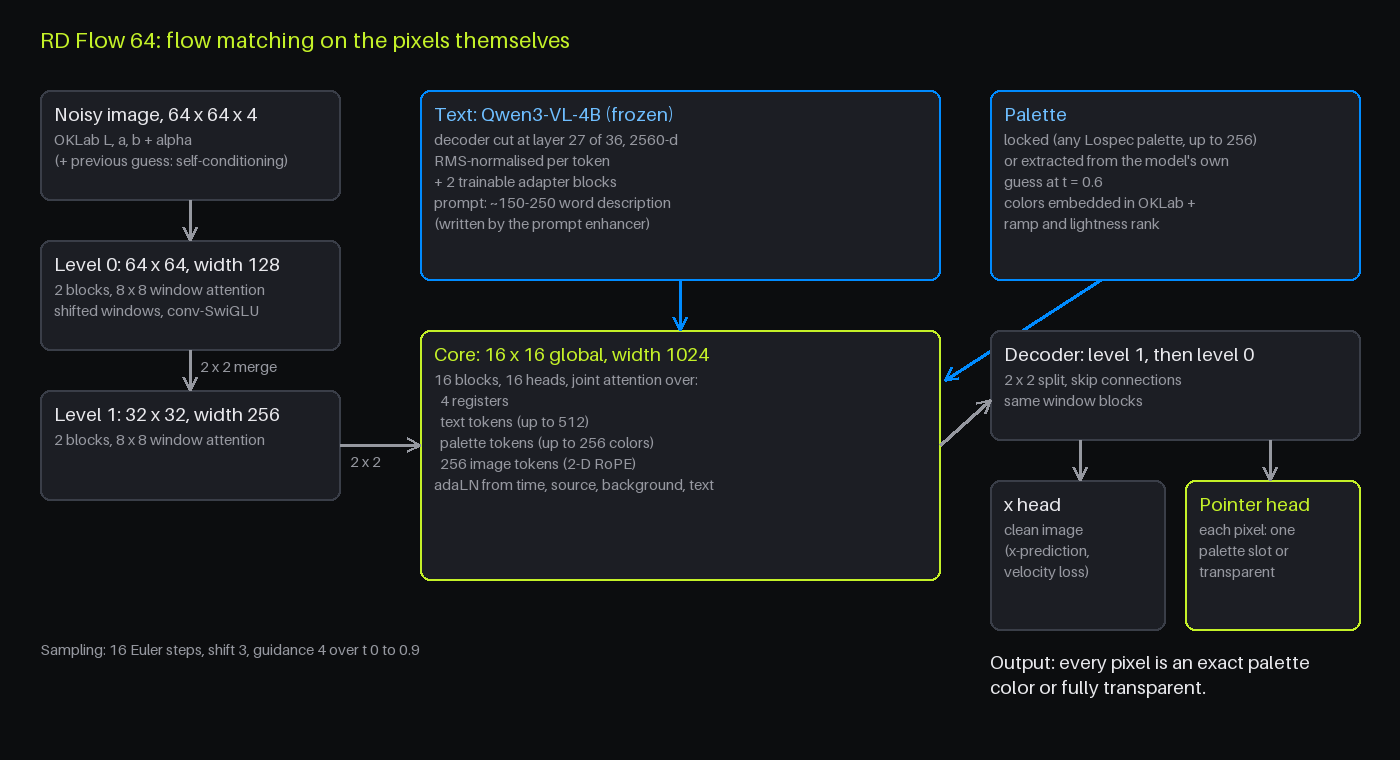
It draws on the pixels themselves
RD Flow 64 works on the 64×64 image directly: four numbers per pixel, the color in OKLab (a perceptual color space where equal steps look equally different) plus an alpha channel. There is no VAE and no latent space, so nothing can blur between the model and the output.
The network is an hourglass transformer. The two outer levels (64×64 and 32×32) use 8×8 window attention, which is cheap and good at local structure: outlines, shading ramps, single-pixel highlights. Two 2×2 merges bring the image down to a 16×16 global core of 16 transformer blocks at width 1,024. Here the image tokens attend jointly to the prompt, to the palette, and to four register tokens, which is where layout and composition are decided. The decoder mirrors the encoder with skip connections.
It is trained with flow matching
Training follows the flow matching recipe: mix a clean image with noise by a random amount, and teach the network to predict the clean image. We use x-prediction with a velocity loss (predicting the clean image is easier for a pixel-space model than predicting the noise), and sample noise levels from a logit-normal distribution so most of the training happens in the middle range where structure forms.
Every pixel comes from a palette
The most pixel-art-specific part is the pointer head. Next to the usual output, the model has a second head that looks at a list of palette colors and points each pixel at one of them, or at "transparent". At the end of sampling the output is the pointer's choice, not a continuous color, so:
- every pixel is exactly one palette color: there are no near-duplicate shades to clean up,
- transparency is binary and real: no halos, no semi-transparent fringes,
- you can lock any palette, and every pixel comes from it.
Where does the palette come from? If you choose one, it is given to the model from the first step. If you don't, the model extracts one from its own in-progress image at 60% of the way through sampling and finishes on it. Palette colors are embedded with their OKLab values plus their position in a shading ramp, so the model knows which colors are darker or lighter versions of each other.
The prompt goes through a frozen language model
Text is read by Qwen3-VL-4B, frozen, with its language half cut at layer 27 of 36 (the layers above it are dropped, so they cost nothing). Two small trainable adapter blocks sit on top. The text tokens join the image and palette tokens in the core's attention, and a pooled summary of the prompt also steers every block through adaptive normalization.
Two more small signals steer the model:
- A background switch, transparent or opaque, always given, so transparency is your choice and never a coin flip.
- A source tag that records which collection each training image came from. At inference it is set to our cleanest source.
How small is 271 million parameters?
Parameters are the numbers a model learns; they set how big it is, how much memory it needs and how fast it runs. 271 million sounds like a lot, but for an image model it is tiny:
- The whole drawing model is a 542 MB file, smaller than many phone games.
- It is about a third of the size of Stable Diffusion 1.5's image network, the model that started the AI art boom in 2022, and 44 to 74 times smaller than the general models people use for pixel art today (FLUX.1 [dev] has 12 billion parameters, Qwen-Image 20 billion).
- It runs on an ordinary gaming graphics card. The drawing model needs under 1 GB of graphics memory; reading the prompt takes a separate, frozen language model of about 3 billion parameters, and the two together still fit easily on a consumer GPU.
Small is what makes RD Flow 64 fast and cheap enough to give away: one graphics card serves everyone using the free generator.
What it learns from
Besides learning to clean up noise, RD Flow 64 is trained to pick the right palette color for every pixel, to keep shading ramps in order, to draw outlines and keep neighboring pixels consistent, and to organize its internal picture the way a strong image-understanding model does. Those extra goals are what make its output read as deliberate pixel art rather than a shrunken painting.
The data
RD Flow 64 saw 525,430 images, every one at 64×64 and every one whole (never cropped out of a bigger picture):
| Source | Images | Share |
|---|---|---|
| Pixel art generated by Retro Diffusion's own models | 349,544 | 67% |
| Real images: hand-made pixel art, and illustrations and landscapes reduced to 64×64 pixel art | 175,886 | 33% |
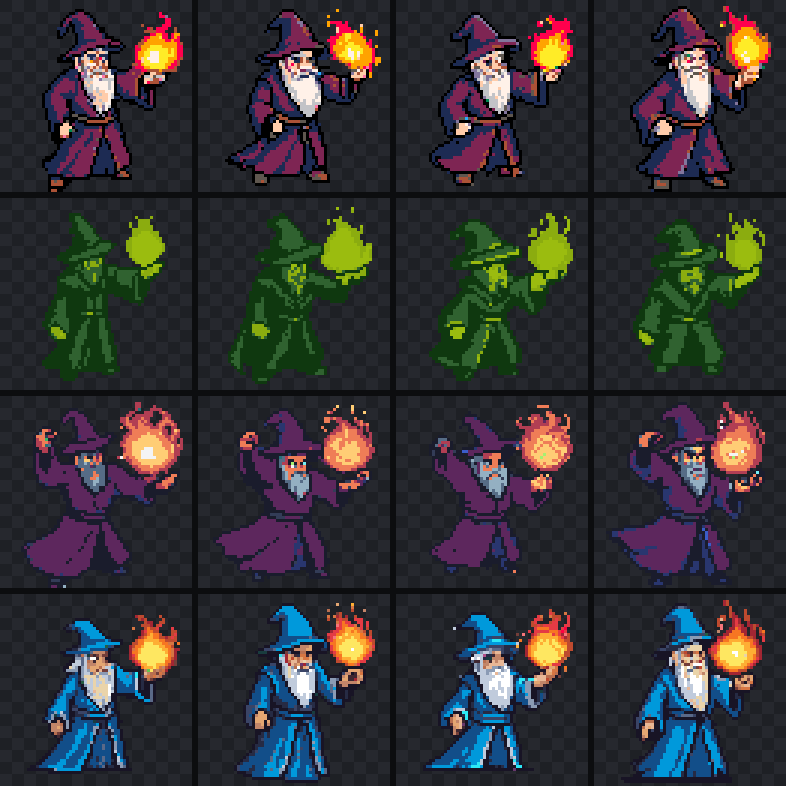
The synthetic two thirds come from Retro Diffusion's production models across many styles: characters, items, creatures, tiles and scenes, about half of them on transparent backgrounds. The real third adds variety the synthetic set lacks, especially faces and landscapes.
Every image was described by a vision model in detail. A typical caption is about 185 words and walks through the picture part by part, top to bottom, with colors, positions, pose, view, background, outline, shading and palette. Each image also has a 40-70 word version, a 2-10 word version, and its original prompt or title. Training mixes them: long 45%, medium 20%, short 15%, original 20%.
That choice matters a lot at inference, as the next section shows.
Two things that made the difference
1. Long prompts, written for you
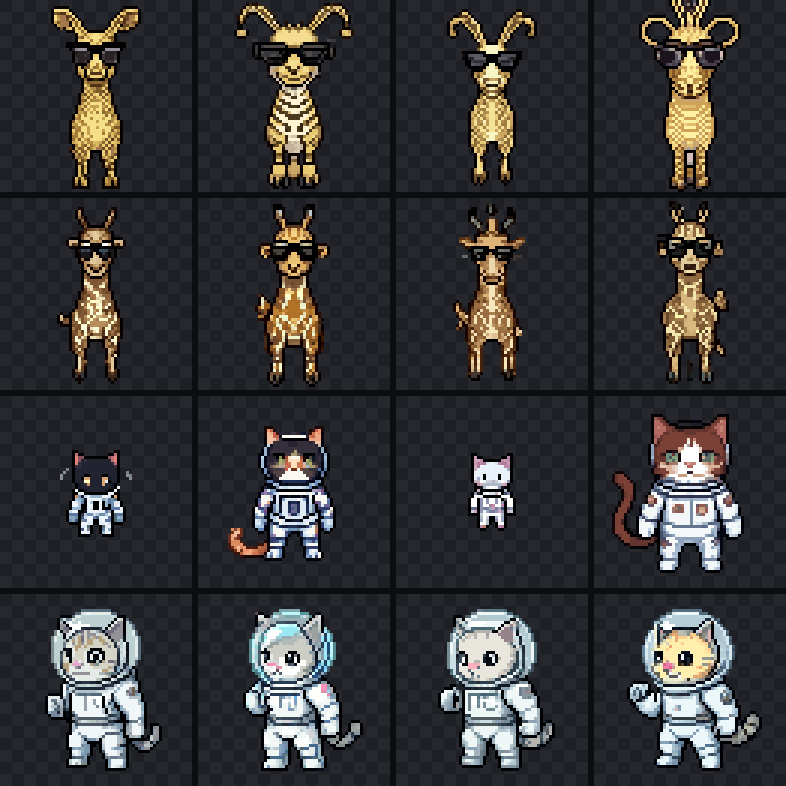
The model learned on long, careful descriptions, and it follows them closely: the crest on a knight's tabard, the cross on his shield, the number of gems on a chest. With a two-word prompt it has to guess, and rare combinations collapse into common ones. "A giraffe wearing sunglasses" typed as-is often comes out as a horned goat.
So RD Flow 64 never sees your words directly. A prompt enhancer (a fast language model) rewrites your request into a description shaped exactly like the training captions, using real captions as examples, and keeps everything you asked for. You can see the expanded prompt under every result.
2. The right amount of guidance
Classifier-free guidance pushes the model toward the prompt. During training our sample sheets used guidance 8, and the model looked mediocre: subjects swelled past the frame, colors went flat and saturated, and stray backgrounds appeared. A sweep over sampler settings showed guidance was the whole problem. At 3-4 the same weights produce clean, well-framed sprites; at 2 they turn soft.
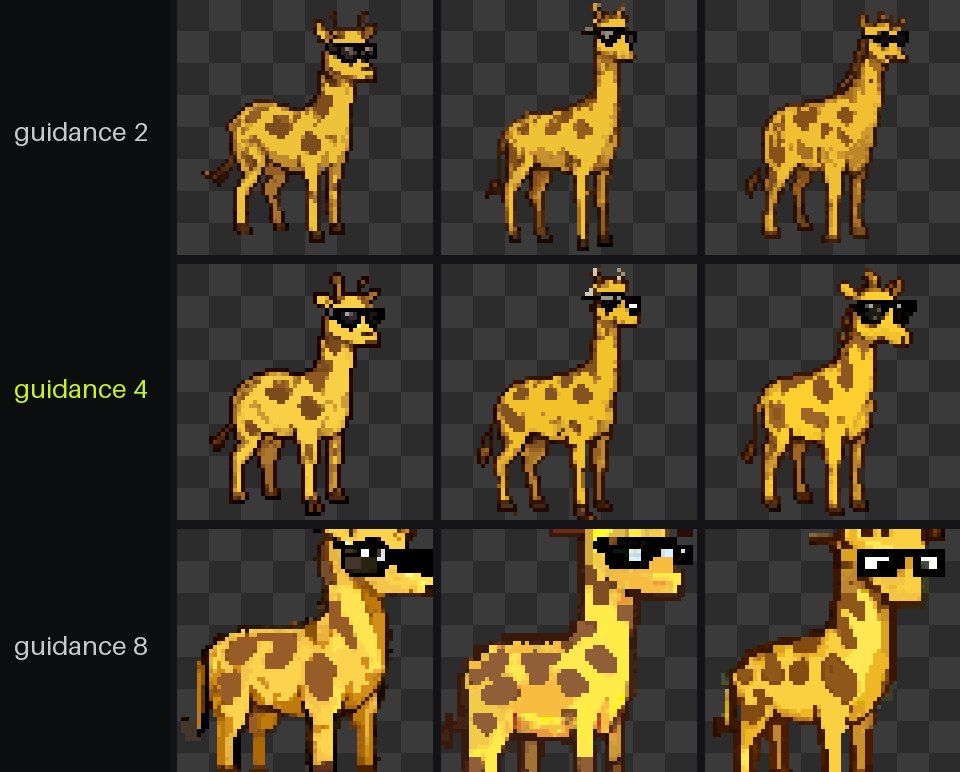
RD Flow 64 samples with 16 Euler steps, guidance 4 applied over the first 90% of the steps, and a time shift of 3 (more steps at high noise, where the layout is decided). Sixteen steps draw the same images as 32; at 8 the colors start to shift.
Results
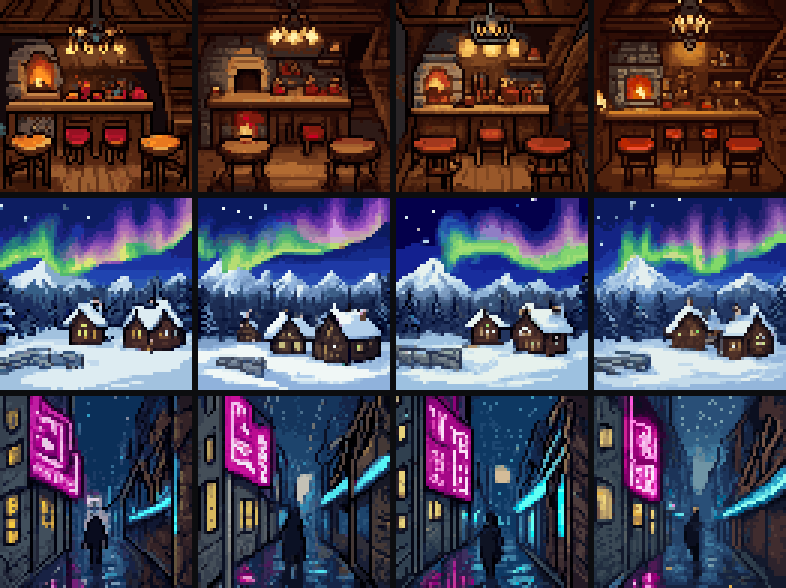
RD Flow 64 is strongest on what 64×64 is used for: characters, creatures, items and props on a transparent background. It draws clean dark outlines, two-step cel shading and limited palettes by default. Scenes work well with the background switch set to opaque.
Compared with general image models
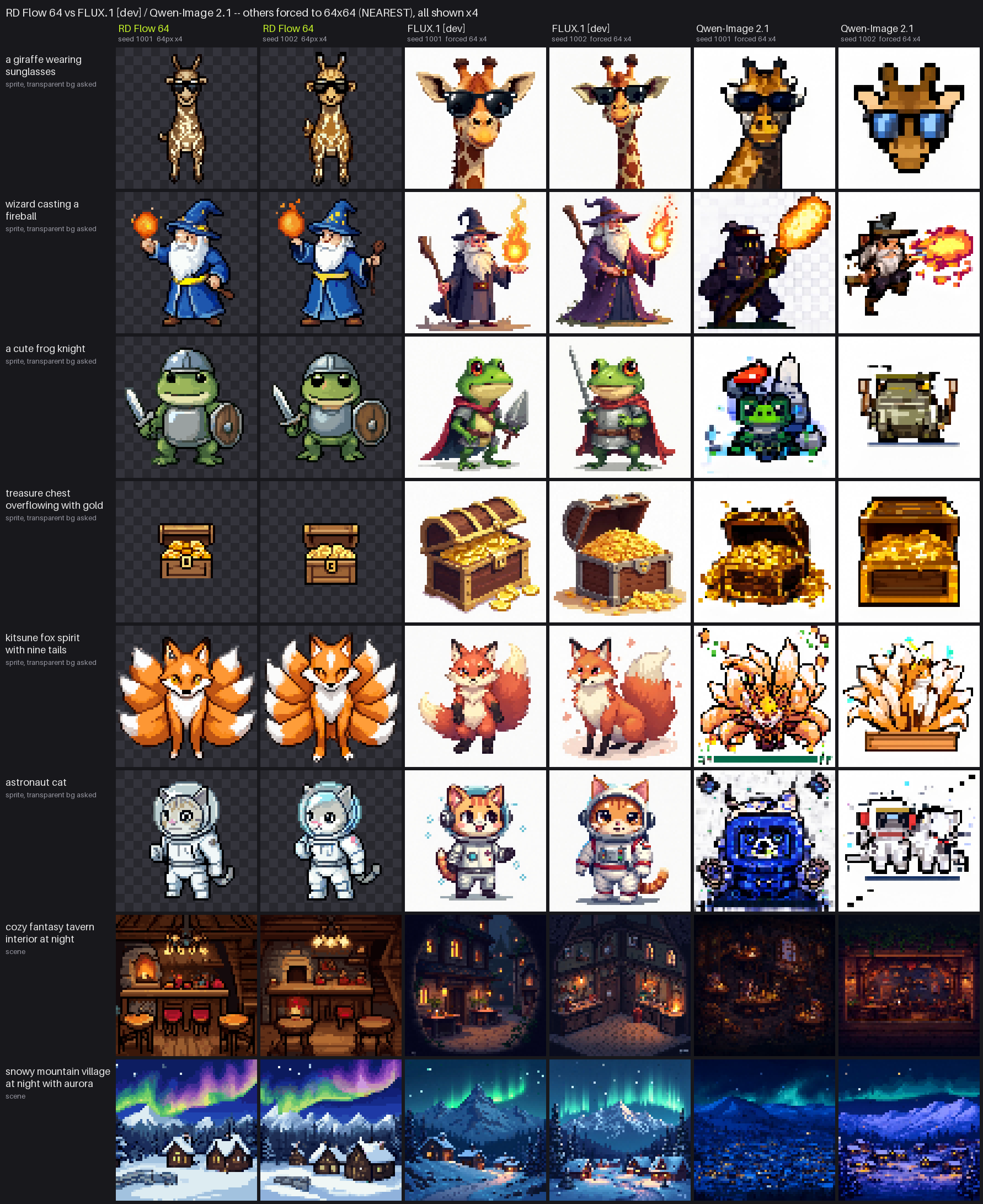
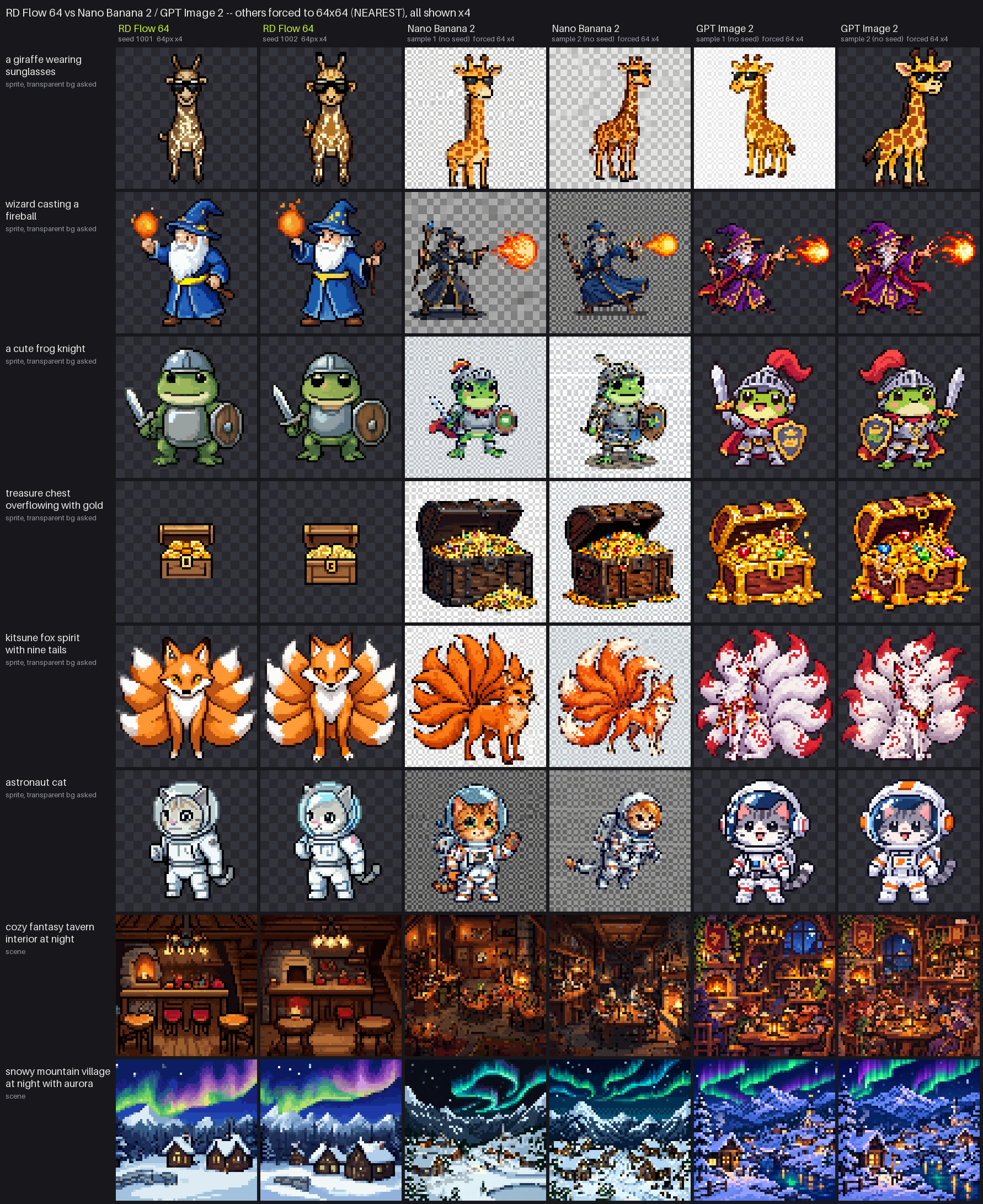
We asked four well-known image models for the same eight subjects the way most people ask a general model for pixel art: "a giraffe wearing sunglasses, 64x64 pixel art sprite, transparent background" (scenes without the background part). Two images each. The general models draw at 1024×1024, so to compare like for like, every output is brought down to the size you asked for, 64×64 (one pixel taken from the centre of each block, with no smoothing or cleanup). RD Flow 64 got the same requests through its prompt enhancer and draws 64×64 directly.
We also measured what you would have to fix before using each image in a game:
| Model | Drawn on a true pixel grid | Real transparent background (sprites) | Colors per image at 64×64 |
|---|---|---|---|
| **RD Flow 64** | **100%** | **100%**, no semi-transparent pixels | **about 40** |
| FLUX.1 [dev] | 0% | 0% (white background) | about 1,700 |
| Qwen-Image 2.1 | 0% | 0% (white background) | about 1,550 |
| Nano Banana 2 | 0% | 0% (a checkerboard painted into the image) | about 1,670 |
| GPT Image 2 | 0% | 92%, but not binary (the subject itself sits at alpha 252-254) | about 2,000 |
What this shows, honestly:
- The big models draw more. GPT Image 2 and Nano Banana 2 in particular follow prompts closely and pack in far more detail, which is what you'd expect from models many times RD Flow 64's size. Their "pixels" are drawn at roughly 45 to 200 effective pixels across, though, and blurred together, so they are not usable as 64×64 art without redrawing.
- None of the general models produce real pixel art. None of their images sits on a true pixel grid, so bringing them down to 64×64 leaves speckled noise and about 1,500 to 2,000 colors per image instead of a palette. Only one returns real transparency, and it isn't clean on/off alpha.
- RD Flow 64's output is ready to use. Every image is 64×64 with a few dozen exact palette colors and binary transparency, four images in half a second on one GPU, against 8-43 seconds of API time for the others.
Compared with Retro Diffusion's full models
RD Flow 64 is a research model, small enough to run for free. Retro Diffusion's production models are the step up. Here are the same requests on RD Lite and RD Core at 64×64, through the public API, next to RD Flow 64:
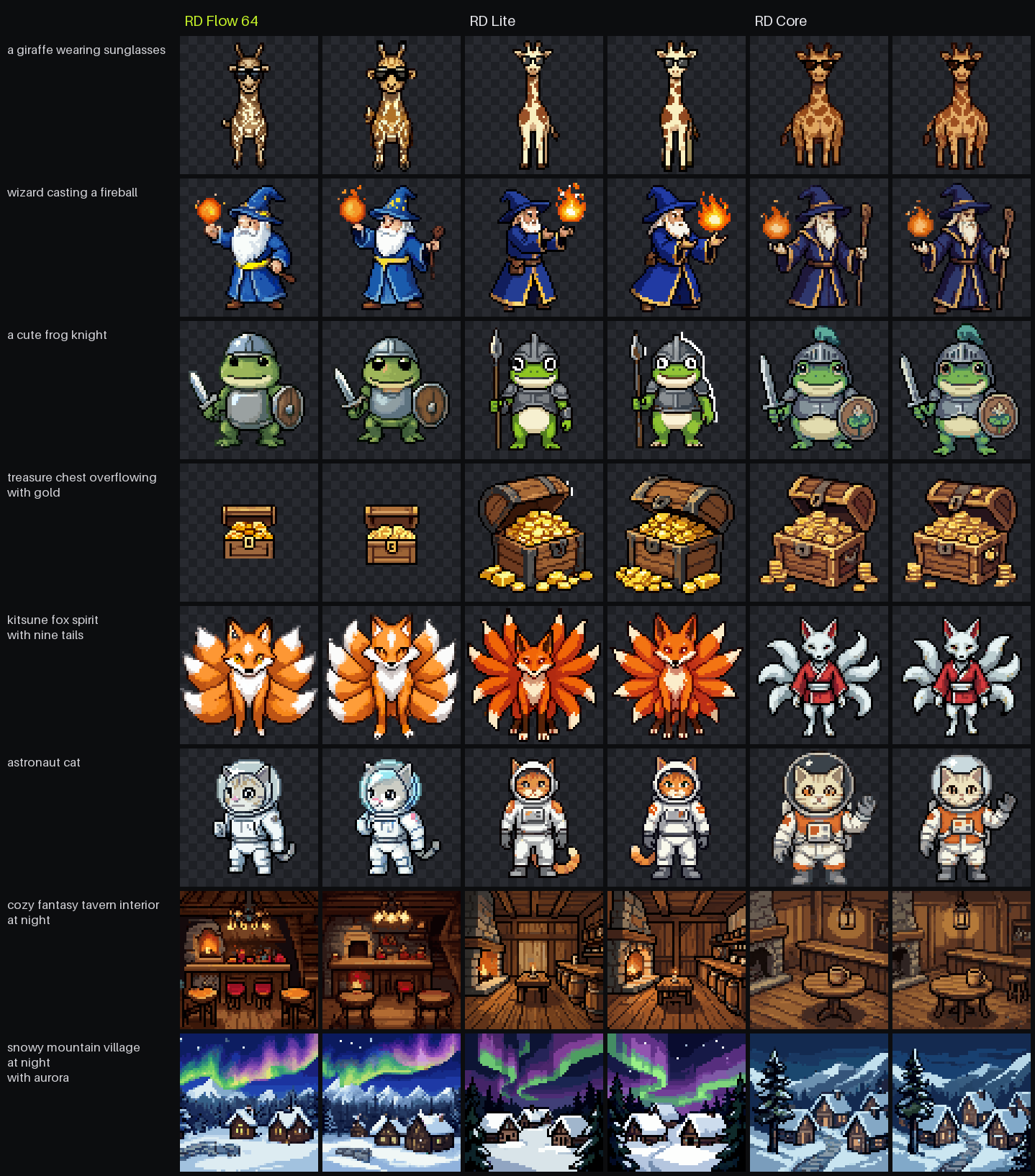
The full models follow prompts more closely and draw more: a giraffe with a real giraffe's neck, a chest actually spilling gold, armor with more parts, and richer shading (about 66 to 74 colors per image against RD Flow 64's 40). They also work at every size from 16 to 512 px and in dozens of styles, with editing, animation and tiles. RD Flow 64 shows what a small model designed around pixels can already do; the full models are what we'd use for a game.
Efficiency
Measured on one RTX PRO 4500 (32 GB, the class of card the live demo runs on), bf16, 16 steps with guidance:
| Batch | Time | Per image |
|---|---|---|
| 1 image | 0.28 s | 0.28 s |
| 4 images | 0.50 s | 0.13 s |
| 8 images | 1.00 s | 0.13 s |
| 16 images | 2.05 s | 0.13 s |
Peak memory is about 8 GB, text encoder included, and encoding the prompt takes under 0.1 s. Two changes made it about three times faster than our first measurements, with the same images: 16 sampling steps instead of 32, and compiling the model, which removes most of the per-step overhead of running a small network. For comparison, general open image models used for pixel art are 12 billion (FLUX.1 [dev]) to 20 billion (Qwen-Image) parameters and render at 1024×1024 before the result is reduced to pixel art. RD Flow 64's generator is about 44 to 74 times smaller and never draws a pixel it doesn't output.
That is why the live demo runs on a single GPU. When it gets busy, requests wait in a short queue that keeps things fair, so no single person can fill it.
Limitations
- 64×64 only. Other sizes need Retro Diffusion's full models.
- Opaque mode is weaker than transparent. Opaque images tend to draw the subject larger and sometimes crop it. Much of the real-image data is close-up and bust framing, and it shows.
- Small details can get lost. At 64 pixels a pirate's eyepatch or a ring on a finger may be one or two pixels, or missing.
- Knowledge is limited. Half a million images is small for an image model. It knows common subjects, not everything.
- Less variety between seeds. The same prompt tends to give similar compositions; change the wording to explore.
- Looser prompt following than the largest models. It can miss an action (holding a fireball rather than casting it) or soften an unusual detail.
- No text. Letters and logos are not something it can draw.
What's next
RD Flow 64 is the first step. The same architecture trains at every size from 16 to 256 pixels, and we're building that next, on far more data.
Try it
- Live demo: the generator above, or RD Flow 64 on its own page. No account needed.
- Weights: coming soon to Hugging Face, free for personal and non-commercial use.
- Everything else: other sizes, dozens of styles, animation, editing and tiles are in Retro Diffusion's full models. New accounts get free daily usage, and Explore shows what people are making.
Frequently asked questions
Can I try RD Flow 64?
Yes. The live demo on Retro Diffusion needs no account. The open weights, coming soon, will be free for personal and non-commercial use.
Can I use RD Flow 64 images in a commercial game?
The open weights are licensed for non-commercial use only. For commercial projects, use Retro Diffusion's models, which come with commercial rights to your outputs.
Why 64x64?
It's the most common size for sprites, items and icons, and building one size well let us prove the architecture before scaling it to every size.
What was RD Flow 64 trained on?
525,430 images at 64x64: two thirds pixel art generated by Retro Diffusion's own models, one third real images (hand-made pixel art, and illustrations and landscapes reduced to pixel art), each described in detail by a vision model.
How fast is it?
Four images take about half a second on one GPU (0.13 seconds per image); a single image takes 0.28 seconds.